How to backup and restore the embedded vCenter…

How to backup and restore the embedded vCenter Server 6.0 vPostgres database

How to backup and restore the embedded vCenter…

https://kb.vmware.com/kb/2091961 This video demonstrates how to backup and restore the embedded vCenter Server 6.0 vPostgres database Backing up and restoring your database protects the data stored in your database. Note: This video is only supported for backup and restore of the vPostgres database to the same vCenter Server. Use of image-based backup and restore is the only solution supported for performing a full, secondary appliance restore. For additional information, see VMware Knowledge Base article 2091961 at the following URL https://kb.vmware.com/kb/2091961


VMware Social Media Advocacy

How to Backup and Restore the Embedded vCenter Server 6.0 vPostgres Database

How to backup and restore the embedded vCenter Server 6.0 vPostgres database

How to backup and restore the embedded vCenter…

https://kb.vmware.com/kb/2091961 This video demonstrates how to backup and restore the embedded vCenter Server 6.0 vPostgres database Backing up and restoring your database protects the data stored in your database. Note: This video is only supported for backup and restore of the vPostgres database to the same vCenter Server. Use of image-based backup and restore is the only solution supported for performing a full, secondary appliance restore. For additional information, see VMware Knowledge Base article 2091961 at the following URL https://kb.vmware.com/kb/2091961


VMware Social Media Advocacy

VMware vSphere 6.5 Configurations Maximums – New Whitepaper

VMware vSphere 6.5 Configurations Maximums – new whitepaper

VMware vSphere 6.5 Configurations Maximums -…

This document supports the version of each product listed and supports all subsequent versions until the document is replaced by a new edition. To check for more recent editions of this document, see http://www.vmware.com/support/pubs


VMware Social Media Advocacy

VMware ESXi 6.5 – ESXCLI Command Reference

VMware ESXi 6.5 – ESXCLI Command Reference – Virten.net

VMware ESXi 6.5 – ESXCLI Command Reference -…

ESXCLI is a powerful command line tool on an ESXi host. You may need it for troubleshooting, configuration or for automated ESXi installations by using a kickstart file. I’m having a esxcli c…Read More


VMware Social Media Advocacy

vSphere 6.5 – Automate VCSA Backup

vSphere 6.5 – Automate VCSA Backup – Brian Graf’s Virtualization Blog

vSphere 6.5 – Automate VCSA Backup – Brian…

I recently attended the Orlando VMUG Usercon and had been discussing many of the great features of the vSphere 6.5 release that was announced at VMworld Barcelona. I began to chat with Rob P., an attendee of the conference, about VCSA backup.


VMware Social Media Advocacy

Installing VMware vCenter Server Appliance 6.5…

Installing VMware vCenter Server Appliance 6.5 – Mike Tabor

Installing VMware vCenter Server Appliance 6.5…

VMware has announced that VMware vSphere 6.5 has gone general available this week. Now installing VMware vCenter Server Appliance 6.5 (VCSA) is even easier as the requirement for the client integration plugin has been removed and now the VCSA appliance is delivered via an ISO image with an installation wizard that’s been broken up into two stages.


VMware Social Media Advocacy

How to Install VCSA 6.5 in VMware Workstation…

How to Install VCSA 6.5 in VMware Workstation [LAB] – vladan.fr

How to Install VCSA 6.5 in VMware Workstation…

This is lab time -:). Normally you don’t do that on your production deployment. This is a guide on How to install VCSA 6.5 in VMware Workstation and see the different configuration options within the VMware vCenter Server Appliance (VCSA) 6.5.


VMware Social Media Advocacy

Get This Week’s List of VMware’s Solutions That Went GA!

Get This Week’s List of VMware’s Solutions That Went GA!


images


The below are the list of VMware solutions that have been Generally Announced (GA) for this week Be sure to know about these and especially look at the details surrounding the vSphere/vSAN 6.5 announcement!!


  • PowerCLI 6.5 Release 1

Get This Week's List of VMware's Solutions That Went GA!

Get This Week’s List of VMware’s Solutions That Went GA!


images


The below are the list of VMware solutions that have been Generally Announced (GA) for this week Be sure to know about these and especially look at the details surrounding the vSphere/vSAN 6.5 announcement!!


  • PowerCLI 6.5 Release 1

A comparison of VMFS5 & VMFS6 in vSphere 6.5 -…

A comparison of VMFS5 & VMFS6 in vSphere 6.5 – vsphere-land.com

A comparison of VMFS5 & VMFS6 in vSphere 6.5 -…

vSphere 6.5 has introduced a new VMFS version 6 and there are a few changes in it compared to VMFS version 5 that you should be aware of.


VMware Social Media Advocacy

A comparison of VMFS5 & VMFS6 in vSphere 6.5 -…

A comparison of VMFS5 & VMFS6 in vSphere 6.5 – vsphere-land.com

A comparison of VMFS5 & VMFS6 in vSphere 6.5 -…

vSphere 6.5 has introduced a new VMFS version 6 and there are a few changes in it compared to VMFS version 5 that you should be aware of.


VMware Social Media Advocacy

vSphere 6.5 & Virtual SAN (vSAN) 6.5 Now Generally Available (GA)!

vSphere 6.5 & Virtual SAN (vSAN) 6.5

Now Generally Available (GA)!

images


vSphere 6.5:

There are 3 themes for vSphere 6.5:

  • Simplified Experience – 
    • simplified architecture (integrated vCenter Server Appliance, Update Manager included all-in-one), no Windows/SQL licensing
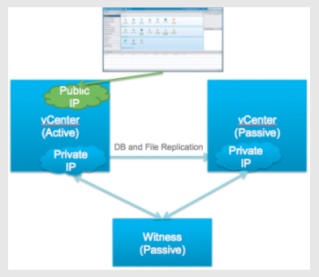
    • Native High Availability (HA) of vCenter for the appliance is built-in – Automatic failover (Web Client may require re-login)
    • Native Backup and Restore of vCenter appliance – Simplified backup and restore with a new native file-based solution. Restore the vCenter Server configuration to a fresh appliance and stream backups to external storage using HTTP, FTP, or SCP protocols.
    • New HTML5-based vSphere Client that is both responsive and easy to use (Based on our new Clarity UI)
  • Built-In Security – 
    • Encryption at rest and in motion – new VM-level encryption capability designed to protect against unauthorized data access. When used with vSphere vMotion, this capability safeguards both data at rest and data in motion
    • secure boot model to make sure images have not been tampered with and to prevent the loading of unauthorized vSphere component
    • secure access, vSphere 6.5 provides multi-factor authentication. You can now configure vCenter Server permissions to require 2-Factor authentication using both a password and a smartcard or RSA key. Plus, vSphere 6.5 offers enhanced audit-quality logging capabilities that provide more information about user actions. IT can now access auditable trails if an investigation into anomalies or security threats require it.
  • Universal App Platform – universal app platform that supports both traditional and next-generation apps (including 3D graphics, big data, machine learning environments, SAP Hana, and SaaS)… vSphere 6.5 expands its workload coverage model by focusing on both scale-up and scale-out next-gen apps that are increasingly built using evolving technology building blocks, such as containers.
    • VIC is extends vSphere capabilities to run container workloads and sits on top of vCenter, and integrates with the rest of the VMware stack like NSX and vSAN…
      • vSphere Integrated Containers where we are enabling the best of both worlds for contained based cloud native apps…
      • vSphere Integrated Containers is the easiest way for vSphere users to bring containers into an existing environment.
      • Integrated containers deliver an enterprise container infrastructure that provides the best of both worlds for the developer and vSphere operations team.
      • Containers are now just as easy to enable and manage as virtual machines.
      • For cloud native apps, there are two audiences we are trying to serve, one is the developers, they want to leverage native docker interface, using the tools that they are familiar with.
      • For IT, operations guys, they want to have control and visibility of these category of applications, they like to leverage tools and processes they have honed in over the years.
    • newly released VMware Cloud Foundation and VMware Cloud Foundation Service are built on vSphere 6.5.
  • IMPORTANT NOTE:  Please be sure to check the vSphere 6.5 compatibility blog (see KB 2147548) before upgrading to vSphere 6.5 if you are currently using other VMware solutions.


     vSphere 6.5 Announcement:  https://blogs.vmware.com/vsphere/2016/10/introducing-vsphere-6-5.html

     vSphere 6.5 Release Notes: http://pubs.vmware.com/Release_Notes/en/vsphere/65/vsphere-esxi-vcenter-server-65-release-notes.html

     Download:  https://my.vmware.com/web/vmware/info/slug/datacenter_cloud_infrastructure/vmware_vsphere/6_5

vsan1


Virtual SAN (VSAN) 6.5:

  • Additional TCO Savings by…
    • Offering New Workload types such as Cloud-Native Apps and the ability for Physical workloads to point to the VSAN datastore via iSCSI
      • vSphere
        • Works off-the-shelf with Docker, Swarm, Kubernetes, …
        • Persistent Docker Volume Driver
      • vSphere Integrated Containers
        • Docker API Compatibility
        • Persistent Volume Driver
        • VM-like container isolation
      • Photon Platform
        • New VSAN for Photon Platform release available
      • Non-virtualized workloads can utilize VSAN for storage (using iSCSI initiators)
    • Support of All-Flash hardware in Virtual SAN (VSAN) STANDARD
    • While eliminating the cost of networking hardware for (2)-Node ROBO deployments.
      • Eliminate router/switch costs by connecting two nodes directly using crossover cables
      • Supports two cross over cables between the
        2-Nodes for higher availability of network
      • Separates VSAN data traffic from witness VM traffic
    • Then we can Accelerate Responsiveness of the business by…
      • Providing a Full-Featured PowerCLI tool to fully automate operational tasks.
      • And then separating witness and Virtual SAN (VSAN) traffic for Stretched Clusters.
    • We have accelerated the adoption of HCI with the support of Next-Gen Hardware
      • By increasing the Cache Sizing
      • As well as now support large capacity drives through the 512e drives.


     Virtual SAN (vSAN) Announcement:  https://blogs.vmware.com/virtualblocks/2016/10/18/vmware-virtual-san-6-5-whats-new/

     vSAN 6.5 Release Notes:  http://pubs.vmware.com/Release_Notes/en/vsan/65/vmware-virtual-san-65-release-notes.html

     Download:  https://my.vmware.com/web/vmware/info/slug/datacenter_cloud_infrastructure/vmware_vsan/6_5


vSphere 6.5 & Virtual SAN (vSAN) 6.5 Now Generally Available (GA)!

vSphere 6.5 & Virtual SAN (vSAN) 6.5

Now Generally Available (GA)!

images


vSphere 6.5:

There are 3 themes for vSphere 6.5:

  • Simplified Experience – 
    • simplified architecture (integrated vCenter Server Appliance, Update Manager included all-in-one), no Windows/SQL licensing
    • Native High Availability (HA) of vCenter for the appliance is built-in – Automatic failover (Web Client may require re-login)
    • Native Backup and Restore of vCenter appliance – Simplified backup and restore with a new native file-based solution. Restore the vCenter Server configuration to a fresh appliance and stream backups to external storage using HTTP, FTP, or SCP protocols.
    • New HTML5-based vSphere Client that is both responsive and easy to use (Based on our new Clarity UI)
  • Built-In Security – 
    • Encryption at rest and in motion – new VM-level encryption capability designed to protect against unauthorized data access. When used with vSphere vMotion, this capability safeguards both data at rest and data in motion
    • secure boot model to make sure images have not been tampered with and to prevent the loading of unauthorized vSphere component
    • secure access, vSphere 6.5 provides multi-factor authentication. You can now configure vCenter Server permissions to require 2-Factor authentication using both a password and a smartcard or RSA key. Plus, vSphere 6.5 offers enhanced audit-quality logging capabilities that provide more information about user actions. IT can now access auditable trails if an investigation into anomalies or security threats require it.
  • Universal App Platform – universal app platform that supports both traditional and next-generation apps (including 3D graphics, big data, machine learning environments, SAP Hana, and SaaS)… vSphere 6.5 expands its workload coverage model by focusing on both scale-up and scale-out next-gen apps that are increasingly built using evolving technology building blocks, such as containers.
    • VIC is extends vSphere capabilities to run container workloads and sits on top of vCenter, and integrates with the rest of the VMware stack like NSX and vSAN…
      • vSphere Integrated Containers where we are enabling the best of both worlds for contained based cloud native apps…
      • vSphere Integrated Containers is the easiest way for vSphere users to bring containers into an existing environment.
      • Integrated containers deliver an enterprise container infrastructure that provides the best of both worlds for the developer and vSphere operations team.
      • Containers are now just as easy to enable and manage as virtual machines.
      • For cloud native apps, there are two audiences we are trying to serve, one is the developers, they want to leverage native docker interface, using the tools that they are familiar with.
      • For IT, operations guys, they want to have control and visibility of these category of applications, they like to leverage tools and processes they have honed in over the years.
    • newly released VMware Cloud Foundation and VMware Cloud Foundation Service are built on vSphere 6.5.
  • IMPORTANT NOTE:  Please be sure to check the vSphere 6.5 compatibility blog (see KB 2147548) before upgrading to vSphere 6.5 if you are currently using other VMware solutions.


     vSphere 6.5 Announcement:  https://blogs.vmware.com/vsphere/2016/10/introducing-vsphere-6-5.html

     vSphere 6.5 Release Notes: http://pubs.vmware.com/Release_Notes/en/vsphere/65/vsphere-esxi-vcenter-server-65-release-notes.html

     Download:  https://my.vmware.com/web/vmware/info/slug/datacenter_cloud_infrastructure/vmware_vsphere/6_5

vsan1


Virtual SAN (VSAN) 6.5:

  • Additional TCO Savings by…
    • Offering New Workload types such as Cloud-Native Apps and the ability for Physical workloads to point to the VSAN datastore via iSCSI
      • vSphere
        • Works off-the-shelf with Docker, Swarm, Kubernetes, …
        • Persistent Docker Volume Driver
      • vSphere Integrated Containers
        • Docker API Compatibility
        • Persistent Volume Driver
        • VM-like container isolation
      • Photon Platform
        • New VSAN for Photon Platform release available
      • Non-virtualized workloads can utilize VSAN for storage (using iSCSI initiators)
    • Support of All-Flash hardware in Virtual SAN (VSAN) STANDARD
    • While eliminating the cost of networking hardware for (2)-Node ROBO deployments.
      • Eliminate router/switch costs by connecting two nodes directly using crossover cables
      • Supports two cross over cables between the
        2-Nodes for higher availability of network
      • Separates VSAN data traffic from witness VM traffic
    • Then we can Accelerate Responsiveness of the business by…
      • Providing a Full-Featured PowerCLI tool to fully automate operational tasks.
      • And then separating witness and Virtual SAN (VSAN) traffic for Stretched Clusters.
    • We have accelerated the adoption of HCI with the support of Next-Gen Hardware
      • By increasing the Cache Sizing
      • As well as now support large capacity drives through the 512e drives.


     Virtual SAN (vSAN) Announcement:  https://blogs.vmware.com/virtualblocks/2016/10/18/vmware-virtual-san-6-5-whats-new/

     vSAN 6.5 Release Notes:  http://pubs.vmware.com/Release_Notes/en/vsan/65/vmware-virtual-san-65-release-notes.html

     Download:  https://my.vmware.com/web/vmware/info/slug/datacenter_cloud_infrastructure/vmware_vsan/6_5


Long Distance Cross vCenter vMotion Requirements

Long Distance Cross vCenter vMotion Requirements – Virtual Me

Long Distance Cross vCenter vMotion requirements

The ability to move virtual machines long distances between two datacenters while running seems like the key example of the power of abstraction.


VMware Social Media Advocacy

Configuration Maximum changes from vSphere 6.0…

Configuration Maximum changes from vSphere 6.0 to vSphere 6.5 – vsphere-land.com

Configuration Maximum changes from vSphere 6.0…

vSphere 6.5 is now available and with every release VMware makes changes to the configuration maximums for vSphere. Since VMware never highlights what has changed between releases in their official Configuration Maximum 6.5 documentation, I thought I would compare the document with the 6.0 version and list the changes between the versions here.


VMware Social Media Advocacy

How to Upgrade ESXi 6.0 to 6.5 via ISO – vladan.fr

How to Upgrade ESXi 6.0 to 6.5 via ISO – vladan.fr

How to Upgrade ESXi 6.0 to 6.5 via ISO – vladan.fr

One of the methods of upgrading VMware ESXi 6.0 to 6.5 is via ISO (or CD-Rom). Most of you probably don’t use much CD-ROMs and CDs, but servers, especially in small client’s environments usually don’t have KVM, iPMI, ILO, Drac… so one of the options is still to upgrade via CD-ROM.


VMware Social Media Advocacy

How to Enable vCenter Server High Availability (HA) in vSphere 6.5 w/single ESXi host?

How to enable vCenter Server High Availability (VCHA) in vSphere 6.5 w/single ESXi host? – virtuallyGhetto

How to enable vCenter Server High Availability…

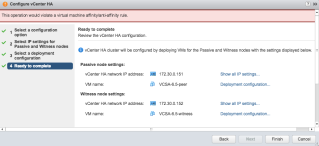
One of the big new features that was introduced in vSphere 6.5, exclusively for vCenter Server Appliance (VCSA), is the vCenter Server High Availability (VCHA) capablilty.


VMware Social Media Advocacy

Migrating to vCenter 6.5: Design Decisions and Important Characteristics/Limitations to Consider

Migrating to vCenter 6.5: Design Decisions and Important Characteristics/Limitations to Consider– vLenzker

Migrating to vCenter 6.5: Design decisions and…

Since vSphere and vCenter 6.5 are released now, a customer engagement put me into a position to gather much more information about characteristics and limitations within vCenter 6.5.


VMware Social Media Advocacy

vCenter Server Appliance (VCSA) 6.5 Installer Improvements

vCenter Server Appliance (VCSA) 6.5 Installer Improvements – Emad Younis Blog

vCenter Server Appliance (VCSA) 6.5 Installer…

The vCenter Server Appliance (VCSA) 6.5 has significant new features and improvements mentioned here. One area of notice is the installer, which in this release not only has a new look and feel but other improvements.


VMware Social Media Advocacy

VMware Announces General Availability of vSphere 6.5!

VMware Announces General Availability of vSphere 6.5!

VMware Announces General Availability of…

Today, we are excited to announce the general availability of VMware vSphere 6.5 along with new releases of other SDDC components: VMware vSAN 6.5, VMware vRealize Automation 7.2, VMware vRealize Log Insight 4 and VMware vRealize Operations 6.4. Together, these products help IT more efficiently run, manage, and secure their applications both on- or off-premises.


VMware Social Media Advocacy

Deploying Nested ESXi is Even Easier Now With the ESXi Virtual Appliance

Deploying Nested ESXi is even easier now with the ESXi Virtual Appliance – virtuallyGhetto

Deploying Nested ESXi is even easier now with…

Several months back I had built an ESXi Virtual Appliance that allows anyone to quickly stand up a fully functional Nested ESXi VM which includes guest customization such as networking, NTP, syslog, passwords, etc.


VMware Social Media Advocacy

What’s New: vSphere 6.5

What’s New: vSphere 6.5 – vWannabe

What’s New: vSphere 6.5

We have an announcement from VMware about vSphere 6.5. I will check this on VMware’s hand on labs (labs.hol.vmware.com) and try to synthesize it here. These labs a are sleek way to experience VMware products without the hassle of setting up everything in your personal lab.


VMware Social Media Advocacy

How to Backup and Restore the Embedded vCenter Server Appliance 6.0 vPostgres Database

How to backup and restore the embedded vCenter Server Appliance 6.0 vPostgres database

How to backup and restore the embedded vCenter…

https://kb.vmware.com/kb/2091961 This video demonstrates how to backup and restore the embedded vCenter Server Appliance 6.0 vPostgres database. Backing up and restoring your database protects the data stored in your database. Note: This article is only supported for backup and restore of the vPostgres database to the same vCenter Server or vCenter Server Appliance. Use of image-based backup and restore is the only solution supported for performing a full, secondary appliance restore. For additional information, see VMware Knowledge Base article 2091961 at the following URL https://kb.vmware.com/kb/2091961


VMware Social Media Advocacy

vSphere 6.5 Technical Overview Q4 2016

[Video] vSphere 6.5 Technical Overview Q4 2016

vSphere 6.5 Technical Overview Q4 2016

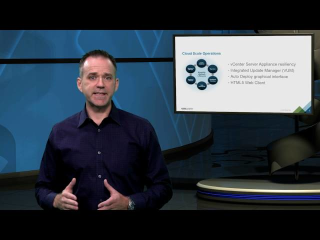
Learn about several of the prominent technology innovations and improvements that will further propel vSphere’s lead in manageability, security, and application delivery. vSphere 6.5 was announced at VMworld Europe 2016.


VMware Social Media Advocacy

Register for the Upcoming Webcast: vSphere 6.5 Training – What’s New!

Register for the Upcoming Webcast: vSphere 6.5 Training – What’s New!

This vSphere 6.5 Training: What’s New webcast provides a high-level look at the new features in vSphere 6.5 and the latest vSphere 6.5 instructor-led classes from VMware Education Services, with a focus on the new vSphere: What’s New [V5.5 to V6.5] course.Learn more.

Registration Link:  https://event.on24.com/eventRegistration/EventLobbyServlet?target=reg20.jsp&partnerref=eduwebsite&eventid=1298523&sessionid=1&key=CAF1B51DB6387F614506AE56DCA8BD7C&regTag=60316&sourcepage=register

2016-11-10_10-10-53

Register for the Upcoming Webcast: vSphere 6.5 Training – What's New!

Register for the Upcoming Webcast: vSphere 6.5 Training – What’s New!

This vSphere 6.5 Training: What’s New webcast provides a high-level look at the new features in vSphere 6.5 and the latest vSphere 6.5 instructor-led classes from VMware Education Services, with a focus on the new vSphere: What’s New [V5.5 to V6.5] course.Learn more.

Registration Link:  https://event.on24.com/eventRegistration/EventLobbyServlet?target=reg20.jsp&partnerref=eduwebsite&eventid=1298523&sessionid=1&key=CAF1B51DB6387F614506AE56DCA8BD7C&regTag=60316&sourcepage=register

2016-11-10_10-10-53

VMware vSphere 6.5 – Native vCenter High Availability (VCSA 6.5 only) – ESX Virtualization

VMware vSphere 6.5 – Native vCenter High Availability (VCSA 6.5 only) – ESX Virtualization

VMware vSphere 6.5 – Native vCenter High…

VMware vSphere 6.5 – Native vCenter High Availability. New simplified native HA is possible allows protect vCenter (VCSA) 6.5 for failures


VMware Social Media Advocacy

vSphere 6.5 – Restore VCSA 6.5 from Backup

vSphere 6.5 – Restore VCSA 6.5 from Backup -via Enterprise Daddy

vSphere 6.5 – Restore VCSA 6.5 from Backup

In this post, we will look at how to restore VCSA 6.5 from backup. In the previous post, we saw how to natively to perform VCSA 6.5 backup which is one of the new features in vSphere 6.5.


VMware Social Media Advocacy

Learning vSphere 6.5-Part-5-Installing vCenter Server on Windows – Virtual Reality

Learning vSphere 6.5-Part-5-Installing vCenter Server on Windows – Virtual Reality

Learning vSphere 6.5-Part-5-Installing vCenter…

Till now in this series we have discussed a lot of theory about vCenter Server/VCSA, deployment type etc and also we looked into system requirements for vCenter Server and PSC installation. Now its lab time where we will see the installation/configuration of the components.


VMware Social Media Advocacy

Learning vSphere 6.5-Part-3-vCenter Server and…

Learning vSphere 6.5-Part-3-vCenter Server and PSC Deployment Types – Virtual Reality

Learning vSphere 6.5-Part-3-vCenter Server and…

In last post of this series we had an overview of VCSA and touched a little bit on what are the new features that are included in VCSA v6.5.


VMware Social Media Advocacy

The difference between VM Encryption in vSphere…

The difference between VM Encryption in vSphere 6.5 and vSAN encryption – Yellow Bricks

The difference between VM Encryption in vSphere…

More and more people are starting to ask me what the difference is between VMCrypt aka VM Encryption and the beta feature we announced not to long ago called vSAN Encryption.


VMware Social Media Advocacy

The difference Between VM Encryption in vSphere 6.5 and vSAN Encryption (Yellow-Bricks)

The difference Between VM Encryption in vSphere 6.5

and vSAN 6.5 Encryption (Yellow-Bricks)


More and more people are starting to ask me what the difference is between VMCrypt aka VM Encryption and the beta feature we announced not to long ago called vSAN Encryption. (Note, we announced a beta, no promises were made around dates or actual releases or releasing of the feature.) Both sounds very much the same and essential both end up encrypting the VM but there is a big difference in terms of how it is implemented. There are advantages and disadvantages to both solutions. Lets look at VM Encryption first.

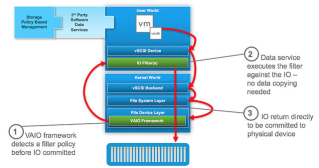
VM Encryption is implemented through VAIO (vSphere APIs for IO Filters). The VAIO framework allows a filter driver to do “things” to/with the IO that a VM sends down to a device. One of these things is encryption. Now before I continue, take a look at this picture of where the filter driver sits.

As you can see the filter driver is implemented in the User World and the action against the IO is taken at the top level. If this for instance is encryption then any data send across the wire is already encrypted. Great in terms of security of course. And all of this can be enabled through policy. Simply create the policy, select the VM or VMDK you want to encrypt and there you go. So if it is that awesome, why vSAN Encryption?


Continue Reading Blog… Click Here!


New vSphere 6.5 APIs worth checking out (Virtually Ghetto)

New vSphere 6.5 APIs worth checking out – virtuallyGhetto

New vSphere 6.5 APIs worth checking out

With the upcoming new release of vSphere, there are quite a few new vSphere APIs to look forward to and consume from an Automation standpoint.


VMware Social Media Advocacy

VMware SDDC Technical Whiteboard

VMware SDDC Technical Whiteboard

VMware SDDC Technical Whiteboard

Trying something different…the VMware software-defined datacenter story in a whiteboard. The whiteboard walks you through the evolution of datacenters…from basic virtualization (vSphere) to an optimized, application-centric, ultra efficient, highly automated and governed SDDC. Enjoy!


VMware Social Media Advocacy

Migrating from VCSA embedded PSC to external PSC

Migrating from VCSA embedded PSC to external PSC – Blah, Cloud.

Migrating from VCSA embedded PSC to external PSC

On a bit of a shorter note to my previous article/novella1 – I have been moving my lab to a bit more of an “enterprise” style architecture – deploying SRM was in the way for that, so I had the need to set up another vCenter, however this gave the opportunity to move to a multi-PSC, multi-VC architecture.


VMware Social Media Advocacy

vCenter Server Appliance (VCSA) 6.5 What’s New…

vCenter Server Appliance (VCSA) 6.5 What’s New Rundown – Emad Younis Blog

vCenter Server Appliance (VCSA) 6.5 What’s New…

During VMworld Barcelona 2016, VMware announced vSphere 6.5. With lots of new features and updates, this is one of the biggest vSphere releases we have had in a while.


VMware Social Media Advocacy

What’s new in vSphere 6.5 Core Storage

What’s new in vSphere 6.5 Core Storage -CormacHogan.com

What’s new in vSphere 6.5 Core Storage

Hello from VMworld EMEA in Barcelona. Well, we can finally talk about vSphere 6.5 today. In this post, I want to highlight a number of new and enhanced features that you will find in vSphere 6.5 related to core storage. Continue reading → The post What’s new in vSphere 6.5 Core Storage appeared first on CormacHogan.com .


VMware Social Media Advocacy

vSphere 6.5 – How VM’s are Secured using…

vSphere 6.5 – How VM’s are Secured using vSphere 6.5 Security Features? -via http://www.vmwarearena.com

vSphere 6.5 – How VM’s are Secured using…

vSphere 6.5 released with lot of new features that most of them were waiting for. vSphere 6.5, the latest version of its industry-leading virtualization platform. This new release of vSphere features a dramatically simplified experience, comprehensive built-in security, and a universal app platform for running any app. I agree with the feature sets, availability and […] The post vSphere 6.5 – How VM’s are Secured using vSphere 6.5 Security Features? appeared first on VMware Arena.


VMware Social Media Advocacy

vSphere 6.5 – Restore VCSA from Backup

vSphere 6.5 – Restore VCSA from Backup -via Brian Graf’s Virtualization Blog

vSphere 6.5 – Restore VCSA from Backup

The previous blog post was about natively backing up the VCSA 6.5. But a backup though is only as good as it’s ability to restore. To be able to restore a VCSA Backup, you will still need the VCSA 6.5 ISO handy, as you will kick off the Appliance Installer UI and click the ‘Restore’ … Continue reading »


VMware Social Media Advocacy

vSphere 6.5 – How to deploy VCSA 6.5

vSphere 6.5 – How to deploy VCSA 6.5 -via Enterprise Daddy

vSphere 6.5 – How to deploy VCSA 6.5

If you remember in the first post of vSphere 6.5, I talked about the improvements in the VCSA 6.5 installer. Well, we are going to now take a look at the VCSA 6.5 installer and use to deploy our VCSA 6.5 appliance.


VMware Social Media Advocacy