VMware Windows Tools Vulnerability Causes Authentication Bypass (CVE-2025-22230)

This article peeked my interest due to the nature of it being a VMware vulnerability. Between the fact that I worked for VMware for many years and I was just working inside VMware Workstation Pro building out a Windows environment the last few days made me take a second look on this article.

The bigger company and more widely used your products, the more it makes you a target for hackers. This just proves no matter how much they may dedicate to securing software, there is always someone smarter and with the time and resources to find a way in!

Below article written by Sergiu Gatlan

Broadcom released security updates today to fix a high-severity authentication bypass vulnerability in VMware Tools for Windows.

VMware Tools is a suite of drivers and utilities designed to improve performance, graphics, and overall system integration for guest operating systems running in VMware virtual machines.

The vulnerability (CVE-2025-22230) is caused by an improper access control weakness and was reported by Sergey Bliznyuk of Positive Technologies (a sanctioned Russian cybersecurity company accused of trafficking hacking tools).

Local attackers with low privileges can exploit it in low-complexity attacks that don’t require user interaction to gain high privileges on vulnerable VMs.

“A malicious actor with non-administrative privileges on a Windows guest VM may gain ability to perform certain high-privilege operations within that VM,” VMware explains in a security advisory published on Tuesday.

Earlier this month, Broadcom also patched three VMware zero days (CVE-2025-22224, CVE-2025-22225, and CVE-2025-22226), which were tagged as exploited in attacks and reported by the Microsoft Threat Intelligence Center.

As the company explained at the time, attackers with privileged administrator or root access can chain these vulnerabilities to escape the virtual machine’s sandbox.

Days after patches were released, threat monitoring platform Shadowserver found over 37,000 internet-exposed VMware ESXi instances vulnerable to CVE-2025-22224 attacks.

Ransomware gangs and state-sponsored hackers frequently target VMware vulnerabilities, as VMware products are widely used in enterprise operations to store or transfer sensitive corporate data.

For instance, in November, Broadcom warned that attackers were exploiting two VMware vCenter Server vulnerabilities: a privilege escalation to root (CVE-2024-38813) and a critical remote code execution flaw (CVE-2024-38812) identified during China’s 2024 Matrix Cup hacking contest.

In January 2024, Broadcom also disclosed that Chinese state hackers had used a critical vCenter Server zero-day vulnerability (CVE-2023-34048) since late 2021 to deploy VirtualPita and VirtualPie backdoors on affected ESXi systems.

SOURCE ARTICLE:

https://www.bleepingcomputer.com/news/security/broadcom-warns-of-authentication-bypass-in-vmware-windows-tools/?utm_source=tldrinfosec

Missed The Latest VMware Announcements In The Past Month? Check Out This Summary!

Missed The Latest VMware Announcements In The Past Month?

Check Out This Summary!


Have you been busy lately and haven’t keep up to date with the latest VMware announcements over the last month or two? If so, you have missed quite a bit! So I thought I would make it easy on you and pull together all the recent announcements related to product updates, acquisitions, promotions, partnerships, VMworld, Wanna Cry Ransomeware, etc. This summary has a lot of great information that you want to be aware. I highly recommend that you read through the full list of announcements to be sure you are aware of them.

One link I would like to draw your attention to specifically is under “Security” which takes you to a VMware blog about the “WannaCry Ransomeware” attack that swept the world on May 12th, 2017 in over 150+ countries worldwide. The article discusses how VMware’s NSX solution and its “Zero Trust” model could have helped those that were attacked mitigate this attack. This just proves how important it is that businesses consider using VMware’s NSX solution to help protect their environments from attacks in ways that other solutions can’t.


Product Announcements:


Acquisitions:


Latest Promotions/Discounts:   http://www.vmware.com/promotions.html

  • New Promotion – User Environment Manager (UEM) 9.2
  • Updated Promotion- vRealize 25% Upgrade Promotions Extended to July 29, 2017


Security:

  • WannaCry Ransomware attack that attacks Microsoft operating systems swept the world on May 12th in over 150+ countries. Below is VMware’s response on how the NSX Zero-Trust model could have helped mitigate this attack using NSX. This is a great opportunity for you to drive how critical it is to use NSX and where other solutions couldn’t provide the same protection that we can from these types of attacks.


VMware Partnerships:  


VMware Partner Accreditation’s:


VMworld 2017:


VMware TrustPoint and AirWatch Integration Demo

VMware TrustPoint and AirWatch Integration Demo

VMware TrustPoint and AirWatch Integration Demo

Learn how out-of-the-box integration of VMware TrustPoint and AirWatch further enhances securing and managing mobile, desktop and server environments, and dynamically drives policy configuration changes across the organization for even stronger compliance and faster threat containment.


VMware Social Media Advocacy

Looking For The Run Down on VMware’s New Horizon Cloud Offerings?

Looking For The Run Down on VMware’s New

Horizon Cloud Offerings?

capture

On February 7th, 2017, VMware announced their new generally available offering “Horizon Cloud“. VMware Horizon Cloud enables the delivery of cloud-hosted or on-premises virtual desktops and apps to any device, anywhere, from a single cloud control plane. The Horizon Cloud delivers Cross-Cloud Architecture, a Clear Path to the Future, Digital Workspace Experience, and Redefines Cost and Complexity.

Below you will find a brief bullet list of information on Horizon Cloud to include top level changes compared to Horizon Air offering, purchasing process, deployment options, virtual desktop options, and considerations for each option, etc.

Horizon Cloud Public Page:  http://www.vmware.com/cloud-services/desktop.html

Top Level Changes in Horizon Cloud:

  • Horizon Air currently does not offer App Volumes, vGPU-enabled desktops, and standard pricing model
  • Current Horizon Air customers will continue to run in vCloud Air (vCA) data centers
  • SoftLayer Data Centers for Horizon Cloud Hosted
  • Desktop Disaster Recovery (DR) no longer offered with Horizon Cloud Hosted
  • Horizon Cloud Services offers App Volumes (Private Beta), vGPU-enabled desktops (Private Beta), vIDM support, and Instant Clones

Considering which offering:

  • Cloud Hosted VDI
    • Seasonal Businesses
    • Mergers & Acquisitions
    • Contract/Temp employees
    • No existing VDI environment or expertise
    • Wants a managed solution
    • Prefers a predictable OPEX payment model
    • Needs to scal up/down quickly
  • On-Premise VDI (Horizon 7) –
    • BYOD
    • Branch Offices
    • Security
    • Leverage existing VDI environment and expertise
    • Has strict security or compliance mandates
    • Needs onm-premises infrastructure for performance
    • Wants strict IT control, including management on-premises
    • Wants to utilize a perpetual license
  • Hybrid VDI –
    • BYOD
    • Branch Offices
    • Desktop Replacements
    • Is interested in the cloud but not ready to commit
    • Has strict security or compliance mandates
    • Needs on-premises infrastructure for performance
    • Simplicity and speed of deployment is a priority
    • Requires flexibility in desktop configurations

Comparisons in Use Case Options:

  • Kiosk Mode – Horizon 7 (On-Premise) ONLY
  • Smart Card Authentication – Horizon 7 (On-Premise) ONLY
  • RDSH Desktops & Apps – Horizon Cloud-Hosted & Horizon 7 (On-Premise)
  • NVIDIA vGPU – Horizon Cloud-Hosted (Private Beta) & Horizon 7 (On-Premise)

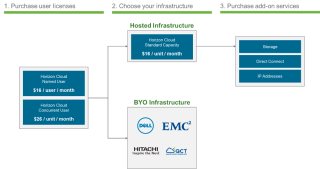
Purchasing Process:

  1. Step 1:  Choose User licensing
    1. Named User (NU) – (1) dedicated user per license
    2. Concurrent User (CCU) – Shared licenses (one user logged in at a time)
  2. Step 2:  Choose your Infrastructure
    1. Buy Hosted Infrastructure from VMware – Cloud-based infrastructure
    2. Buy On-Premises Infrastructure from partner – vSAN Ready Nodes or HCI Appliance
  3. Step 3:  Horizon Cloud Add-Ons
    1. Direct Connect (1/10 Gps)
    2. Additional IP Addresses
    3. 1TB Hard Disk Storage (can be used for AppStacks, Writable Volumes, UEM, and Utility server (E:/Drive)
    4. With more to come

Deployment Options:

  • Horizon Cloud with Hosted Infrastructure
    • Meant for…
      • OPEX model of utility based pricing
      • Scalability on demand
      • Minimal internal expertise required
      • Remote locations where building data center capacity is impossible
    • Offering comes with
      • Production Support
      • Services that include Corp. Network Services setup (via VPN)
      • Administrative training
      • REST API access for programmatic pool management
      • Desktop capacity based on what you purchased
      • (10) images that are fully customizable
      • Free software endpoint clients
      • Supports 2-Factor authentication –
        • Radius
        • RSA SecurID
        • VMware Verify with vIDM
        • DOES NOT provide 2FA for Horizon Amin console
      • Utility Server for free – to use as AD/DNS/DHCP, UEM, File Server, etc. (CANT be used as application or database server)
        • Tenant accessible
        • Uses the Professional Desktop Specification (2vCPU & 4GB vRAM) – can be upgraded
        • Transactional based applications are not allowed and customers should use IaaS
        • Encrypted hard disks not allowed
    • End Customer or Service Provider Provides
      • Desktop Management
      • Access devices (end-point)
      • Applications
      • Image creation, deployment, and maintenance
      • OS licenses
    • Benefits:
      • Cloud Simplicity –
        • Fully hosted & managed infrastructure
        • Enterprise security with dedicated infrastructure
        • (3) global locations and counting
      • Fast Time-to-Value –
        • Add capacity in days, not months
        • Configure and deploy desktops in minutes
      • Most Comprehensive DaaS Solution –
        • Persistent, Floating, Apps, and vGPU-enabled desktop options
        • Blast Extreme & PCOIP connection protocols
        • Configure your own capacity
      • Predictable Economics –
        • Consumption-based pricing let you pay “as-you-grow”
        • No capital expenditure
  • Horizon Cloud with On-Premises Infrastructure
    • Meant for…
      • Hybris OPEX/CAPEX model
      • Management infrastructure in the cloud
      • On-Premises virtual desktops & apps on (HCI) Hyper-Converged Infrastructure (e.g. VxRail)
      • Minimal internal expertise required and easily scalable
    • Benefits:
      • Bridge to the Cloud –
        • Cloud adoption at your own pace
        • Sensitive data resides on premises
        • Proximity reduces latency issues
      • Backed by ecosystem of partners –
        • Growing ecosystem of certified partners
        • Dell, EMC, QCT, Hitachi, and more
      • Radically simple on-premises VDI –
        • Easy to deploy HCI appliances
        • Automated updates & no more management infrastructure
        • Turnkey solution yields faster time-to-value
      • Linear scalability –
        • No CAPEX for service
        • Centralized cloud management
        • Right-sized HCI appliances
  • On Premises (Horizon 7):
    • Meant for…
      • CAPEX model
      • Greater flexibility in desktop options
      • Scalable to customer requirements
      • Feature rich management

On-Premises Infrastructure Options: (more certified servers coming in the future)

  • Dell
    • R730
    • R730xd
  • EMC
    • EMC VxRail160 Hybrid
    • EMC VxRail200 Hybrid
    • EMC VxRail160 All-Flash
    • EMC VxRail200 All-Flash
    • EMC VxRail240 All-Flash
    • EMC VxRail280 All-Flash
  • Quanta Cloud Technology (certification pending)
    • QuantaGrid D51B-1U
    • QuantaPlex T41S-2U (4-Node)
  • Hitachi Data Systems (certification pending)
    • V210
    • V210-F

Virtual Desktop Purchase Options:

  • STANDARD Capacity (everyday use)
    • (1) UNIT = (1) vCPU / 2GB vRAM / 30GB Storage
    • Desktop Options
      • Value = (1) Unit
      • Professional = (2) Units
      • Premium  = (4) units
      • Performance = 8) units
      • Hosted Apps Server = (8) units
  • WORKSTATION Capacity (High Performance/GPU-enabled)
    • (1) UNIT = (4) vCPU / 16GB vRAM / 120GB Storage / 2GB NVIDIA Video Memory
    • Desktop Options
      • ProfessionalWS = (1) unit
      • PremiumWS = (2) units
      • PerformanceWS = (4) units


VMware’s Partner Provided – End User Computing (EUC) TestDrive DEMO Environment!

VMware’s Partner Provided – End User Computing (EUC)  TestDrive DEMO Environment!

capture

For many of VMware’s partners, they don’t have a demo environment in which they can deploy VMware’s End User Computing solutions such as Horizon 7, App Volumes, User Environment Manager (UEM), etc. This is due to not having the spare server hardware or the funds to purchase hardware just for a demo environment. As a partner, they need to be able to demo the VMware EUC based solutions to their customers to show the value as it relates to the customer’s business needs.

Well the VMware partners are in luck! VMware has provided a EUC demo environment called “EUC TestDrive” in which our partners can access to demo EUC solutions to your customers. Many of the below VMware solutions are installed and ready to demo in the EUC TestDrive environment.

So if you are a VMware partner that resells VMware’s EUC-based solutions, make sure you look into the below requirements to get an account and use the EUC TestDrive Demo environment! Also, I have created an enablement video where I go through the EUC TestDrive demo environment and provide you an overview of how to use the portal and what capabilities are offered in it. So check out my overview video listed below!

EUC TestDrive Demo Environment Overview Enablement Video:  https://youtu.be/zGqiS6Mf8gc

VMware Solutions in EUC TestDrive Demo Environment:

  • Horizon 7 (Virtual Desktops)
    • NVIDIA vGPU enabled virtual desktops (High Performance – Graphics Intensive Applications)
  • Workspace ONE / VMware Identity Manager (SSO Portal)
  • VMware Verify (2-Factor Authentication)
  • TrustPoint (Enterprise Endpoint Security)
  • App Volumes (Application Virtualization)
  • (UEM) User Environment Manager (User Profile Management)
  • Airwatch / Airwatch Express (Mobile Device Management)
  • vRealize Operations for Horizon (Operations & Monitoring)
  • vRealize Log Insight (Log Management)
  • NSX Integrations with EUC Solutions (Virtual networking & security)

Partner Requirements for EUC TestDrive Account:

EUC TestDrive DEMO Portal:  https://www.vmtestdrive.com

EUC TestDrive “How-To” Videos:  https://videos.vmtestdrive.com/

VMware Horizon Cloud: Virtual Desktops & Apps

VMware Horizon Cloud: Virtual Desktops & Apps

VMware Horizon Cloud: Virtual Desktops & Apps

Horizon Cloud delivers feature-rich virtual desktops and applications using a purpose-built cloud platform that is scalable across multiple deployment options, including on-premises infrastructure or fully managed infrastructure from VMware. Learn more at http://vmware.com/go/horizoncloud.


VMware Social Media Advocacy

VMware Horizon Cloud Demo

VMware Horizon Cloud Demo

VMware Horizon Cloud Demo

VMware Horizon Cloud delivers feature-rich virtual desktops and applications using a purpose-built cloud platform. Horizon Cloud service scales across multiple deployment options, including on-premises or fully managed infrastructure from VMWare. Learn more at: http://vmware.com/go/horizoncloud


VMware Social Media Advocacy

The Next Horizon! Introducing Horizon 7.1 Horizon Apps & Horizon Cloud

The Next Horizon! Introducing Horizon 7.1, Horizon Apps & Horizon Cloud

The Next Horizon! Introducing Horizon 7.1,…

Today, we are excited to announce new technologies and offerings that drive the cost and complexity out of getting started and allow you to address more use cases than ever before.


VMware Social Media Advocacy

vRealize Operations for Horizon and Published Applications version 6.4

vRealize Operations for Horizon and Published Applications version 6.4 – via VMware EUC Blog

vRealize Operations for Horizon and Published…

This blog post introduces new support for monitoring VMware App Volumes, View in VMware Horizon 7, and VMware Access Point. The first blog in this series introduced what is new in VMware vRealize Operations for Horizon and Published Applications 6.4.


VMware Social Media Advocacy

New Technical White Paper – Workspace ONE Enterprise Edition Reference Architecture

New Technical White Paper – Workspace ONE Enterprise Edition Reference Architecture – via ntpro.nl

New Technical White Paper – Workspace ONE…

This white paper is a reference architecture for VMware Workspace ONE Enterprise Edition. It covers the integration of key components of a Workspace ONE implementation—VMware AirWatch, VMware Identity Manager, VMware Horizon 7, and the Workspace ONE mobile apps.


VMware Social Media Advocacy

New Reviewer’s Guide for View in VMware Horizon 7 – A Series of Mini-Guides

New Reviewer’s Guide for View in VMware Horizon 7 – A Series of Mini-Guides – via VMware EUC Blog

New Reviewer’s Guide for View in VMware Horizon…

I am very happy to announce that we just posted the first four mini-guides in a series of seven to bring you the latest update of View, the main component of VMware Horizon 7! Unlike previous Reviewer’s Guides, you are getting the latest updates literally as soon as we complete each section. The result? Shorter pieces that are easier to digest.


VMware Social Media Advocacy

[Virtual Event] EUC Insights 2017

[Virtual Event] EUC Insights 2017

[Virtual Event] EUC Insights 2017

EUC Insights 2017 is coming 2/15! Sign up today for this half-day virtual event to experience hands-on labs, solution-specific breakout sessions and to hear a Digital Workspace keynote delivered by VMware SVP and General Manager, Sumit Dhawan:


VMware Social Media Advocacy

VMware Brings Adaptiva to AirWatch UEM for Windows 10 Deployments

VMware Brings Adaptiva to AirWatch UEM for Windows 10 Deployments — Redmondmag.com

VMware Brings Adaptiva to AirWatch UEM for…

In its latest effort to extend its AirWatch platform beyond core mobile device management (MDM), VMware today said it has tapped Adaptiva to integrate its OneSite peer-to-peer software distribution tool with its new AirWatch Unified Endpoint Management (UEM) offering.


VMware Social Media Advocacy

Top 10 Tips for a Successful Horizon VDI

Top 10 Tips for a Successful Horizon VDI

Top 10 Tips for a Successful Horizon VDI

Here are my top ten tips and tricks for a smoother deployment of VMware Horizon® View™ Standard Edition. These suggestions are informed after spending several years as a Technical Support Engineer. This is not a complete list, so please refer to the official Horizon View Documentation when planning your deployment.


VMware Social Media Advocacy

Announcing the VMware Horizon 7 Enterprise Edition Multi-Site Reference Architecture Paper

Announcing the VMware Horizon 7 Enterprise Edition Multi-Site Reference Architecture Paper

Announcing the VMware Horizon 7 Enterprise…

Organizations want to keep the business operating during an extended or catastrophic technology outage, providing continuity of service and allowing staff to carry out their day-to-day responsibilities. VMware Horizon 7 Enterprise Edition Multi-Site Reference Architecture provides best practices and architectural blueprints for building a deployment that addresses these issues.


VMware Social Media Advocacy

VMware Horizon 7 Reviewer’s Guide

VMware Horizon 7 Reviewer’s Guide

VMware Horizon 7 Reviewer’s Guide

Reviewer guides are fairly popular as they not only gives you a great summary of new VMware products but also because they also walk you through the configuration steps. This one is however not the case for VMware Horizon 7 Reviewer’s Guide as this one has just the “Quick-start” in the title. The how-to and installation […] Read the full post VMware Horizon 7 Reviewer’s Guide at ESX Virtualization .


VMware Social Media Advocacy

VMware’s EUC TestDrive Accelerates Windows 10 and AirWatch Solutions

TestDrive Accelerates Windows 10 and AirWatch Solutions – VMware Blogs

TestDrive Accelerates Windows 10 and AirWatch…

Moving to Windows 10 is a struggle for customers even though they understand the urgency driven by the Windows 7 end of life coming next July. Some of these customers are in the planning stages while others are still researching what to do and developing a plan. Partners, especially those in trusted advisor roles, are […] The post TestDrive Accelerates Windows 10 and AirWatch Solutions appeared first on Power of Partnership .


VMware Social Media Advocacy

App Volumes Deployment Considerations: Updated for VMware App Volumes 2.12 – VMware EUC Blog

App Volumes Deployment Considerations: Updated for VMware App Volumes 2.12 – VMware EUC Blog

App Volumes Deployment Considerations: Updated…

The following people authored the white paper: Jason Marshall, Tina de Benedictis, Tristan Todd, Stéphane Asselin, Dean Flaming, Jim Yanik, and Samir Patel. Guy Klages and Gina Daly contributed additional assistance.


VMware Social Media Advocacy

Checkout VMware’s Latest EUC Product Releases

Checkout VMware’s Latest EUC Product Releases – The SLOG

Checkout VMware’s Latest EUC Product Releases -…

This week VMware released some EUC focused product updates thatI think you will be interested in. I’ve gone through and picked my top 3 features for each release. All three product updates should now be available via the VMware Downloadsportal. Horizon 7.0.3 My top 3 release highlights: Horizon PowerCLI – Now you can use PowerCLI […] Related posts: VMware Blast Extreme Blast Extreme Polices VMware Horizon View v2.0 Clients: Released VMware Horizon View 5.2 Feature Pack 1: Released How Can I…Read More


VMware Social Media Advocacy

Horizon 7.0.3 and Horizon Client 4.3: The Next Step in Win10, UX, Automation & Availability

Horizon 7.0.3 and Horizon Client 4.3: The Next Step in Win10, UX, Automation & Availability – VMware EUC Blog

Horizon 7.0.3 and Horizon Client 4.3: The Next…

The VMware Horizon team continues the push to deliver our vision of any application on any device. We’re pleased to announce that with the general availability of Horizon 7.0.3 and Horizon Client 4.3, we’ve taken the next step on that journey. [Download Horizon 7.0.3 and Horizon Client 4.3] These releases extend Windows 10 capabilities, push […] The post Horizon 7.0.3 and Horizon Client 4.3: The Next Step in Win10, UX, Automation & Availability appeared first on VMware End-User Computing Blog .


VMware Social Media Advocacy

Horizon 7.0.3 and Horizon Client 4.3: The Next Step in Win10, UX, Automation & Availability

Horizon 7.0.3 and Horizon Client 4.3: The Next Step in Win10, UX, Automation & Availability – VMware EUC Blog

Horizon 7.0.3 and Horizon Client 4.3: The Next…

The VMware Horizon team continues the push to deliver our vision of any application on any device. We’re pleased to announce that with the general availability of Horizon 7.0.3 and Horizon Client 4.3, we’ve taken the next step on that journey. [Download Horizon 7.0.3 and Horizon Client 4.3] These releases extend Windows 10 capabilities, push […] The post Horizon 7.0.3 and Horizon Client 4.3: The Next Step in Win10, UX, Automation & Availability appeared first on VMware End-User Computing Blog .


VMware Social Media Advocacy

Getting started with PowerCLI 6.5 and Horizon View

Getting started with PowerCLI 6.5 and Horizon View – Virtu-Al.Net

Getting started with PowerCLI 6.5 and Horizon…

One of the recent enhancement released in PowerCLI 6.5 R1 was the addition of a new Horizon View Module which allows you to manage Horizon View from a remote connection, this is a huge enhancement from the previous PowerShell implementation which fell short by many means. With the new Horizon View Module you will be … Continue reading Getting started with PowerCLI 6.5 and Horizon View → This post was original written and posted by Alan Renouf here: Getting started with PowerCLI 6.5 and…Read More


VMware Social Media Advocacy

Replacing the Self-Signed Certificate in VMware App Volumes 2.12

Replacing the Self-Signed Certificate in VMware App Volumes 2.12 – VMware EUC Blog

Replacing the Self-Signed Certificate in VMware…

The latest release of VMware App Volumes includes several new features and enhancements. This blog post focuses on a new capability that encrypts and secures communication between App Volumes Manager and App Volumes Agent. This blog post walks you through the process of replacing the Manager self-signed certificate with a Microsoft CA-signed certificate. After you read through this blog post, if you would like to see the process, watch this video, Replacing the App Volumes 2.12 Default…Read More


VMware Social Media Advocacy

Check Out This Week’s Generally Available (GA) Announcements From VMware!

Check Out This Week’s Generally Available (GA)

Announcements From VMware!

whats_new-1


The Virtually Connected “What’s New” Tab:  https://thevirtuallyconnected.net/whats-new/

Check Out This Week's Generally Available (GA) Announcements From VMware!

Check Out This Week’s Generally Available (GA)

Announcements From VMware!

whats_new-1


The Virtually Connected “What’s New” Tab:  https://thevirtuallyconnected.net/whats-new/

The Best Keeps Getting Better: Introducing App Volumes 2.12

The Best Keeps Getting Better: Introducing App Volumes 2.12 – VMware EUC Blog

The Best Keeps Getting Better: Introducing App…

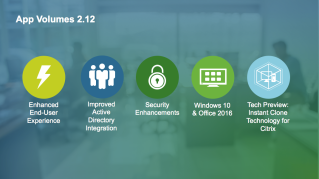
“We’ve tested with the new 2.12 version of App Volumes and see a decrease of login time by 30% to 50% dependent on the amount of AppStacks a user has assigned. Stability and flexibility have also been improved in version 2.12. All and all we are happy with how 2.12 works out in our environment.” […] The post The Best Keeps Getting Better: Introducing App Volumes 2.12 appeared first on VMware End-User Computing Blog .


VMware Social Media Advocacy

Publishing Applications with VMware Horizon 7…

Publishing Applications with VMware Horizon 7 Quick-Start Guide – ntpro.nl

Publishing Applications with VMware Horizon 7…

Welcome to the Publishing Applications with VMware Horizon 7 Quick-Start Guide. This guide shows you how to quickly install and deploy published applications with VMware Horizon 7. Whether you are new to published applications or run an existing published applications environment, this guide takes you step by step through the installation and configuration of the key software components.


VMware Social Media Advocacy

Horizon View 7.0.1 and 7.0.2 add Flexibility to Features

Horizon View 7.0.1 and 7.0.2 add flexibility to features

Horizon View 7.0.1 and 7.0.2 add flexibility to…

VMware Horizon View 7.0.1 and 7.0.2 brings flexibility to the features that were released in the original version earlier this season.


VMware Social Media Advocacy

VMware Horizon View 7 License Comparison

VMware Horizon View 7 License Comparison – vEnthusiast

VMware Horizon View 7 License Comparison

If you are like me, I am not a fan of how VMware website shows the features and license comparison. I made a table that’s visually appetizing.


VMware Social Media Advocacy

New Technical White Paper – VMware Horizon 7 Enterprise Edition Multi-Site Reference Architecture

New Technical White Paper – VMware Horizon 7 Enterprise Edition Multi-Site Reference Architecture – ntpro.nl

New Technical White Paper – VMware Horizon 7…

This reference architecture details and shows validation of a Horizon 7 Enterprise Edition solution that delivers business continuity and disaster recovery to a set of identified use cases.


VMware Social Media Advocacy

Free Book Answers Your Top Application Delivery and Management Questions

Free Book Answers Your Top Application Delivery and Management Questions

Free Book Answers Your Top Application Delivery…

According to Charles Barrett, Mark Ewert, and Ben Goodman, authors of the free ebook Applications for Dummies:


VMware Social Media Advocacy

Horizon 7 Blast Extreme Technical Whitepaper

download-1


VMware Horizon 7 Blast Extreme Primer—Everything an Admin Needs to Know

Everyone watches videos on their phones, tablets, PCs, or laptops, either as part of their daily work or as a break-time activity. Most people like to use more than one type of device to do their work, and they like the flexibility of being able to work from a variety of settings: office, home, hotel, café, doctor’s waiting room, and so on. Work-life balance has become something of an extreme sport. For these people, VMware is here to help, offering the Blast Extreme display protocol, a major feature of the VMware Horizon 7release.

This user-interface remoting technology is easy to set up, manage, and troubleshoot, and now all the information administrators need is gathered into one concise document. VMware End-User-Computing Technical Marketing is happy to announce the publication of a new white paper, Blast Extreme Display Protocol in Horizon 7.

Blast Extreme uses standard, natively supported encoding formats, including H.264 and JPG/PNG, and can use either UDP or TCP transport, which means

  • Broad client support: Windows, Linux, Mac, Android, iOS, Chrome, Web browsers (HTML Access), and more than 70 thin and zero clients
  • Port sharing over TCP: Requires opening only one port on the front-end firewall when TCP port sharing is used with Access Point
  • Lower CPU consumption on H.264-capable devices because video decoding is performed by hardware on the user’s phone, tablet, or computer

In addition, VMware designed Blast Extreme in partnership with NVIDIA so that video encoding can be performed by hardware in an NVIDIA GRID card. With Blast Extreme and NVIDIA GRID vGPU, many power users of 3D-rendering applications can share a single GPU. To see how greatly Blast Extreme improves performance when compared with PCoIP, the incumbent protocol, see VMware Horizon Blast Extreme Acceleration with NVIDIA GRID.

Of course, performance without features would not be very useful, so Blast Extreme provides the same feature-rich experience that users are accustomed to enjoying with PCoIP. The following figure shows all possible ports and protocols that can be used for Blast Extreme, including those used for various remote-experience features, for both internal and external connections.


vmware-horizon-7-view-blast-extreme-display-protocol_1-768x998


This white paper, Blast Extreme Display Protocol in Horizon 7, includes sections on deployment, optimization tips, security, and using logs for troubleshooting and verifying configuration on both the client side and the agent side (virtual desktop or hosted application).


Horizon 7 – Blast Extreme Whitepaper:  Click Here!


VMware Horizon 7 Instant Clones Best Practices

VMware Horizon 7 Instant Clones Best Practices – vDelboy’sView

VMware Horizon 7 Instant Clones Best Practices

Recently, I have been working with Instant Clones in my lab. Although I have found this easy to get up and running (for more information, see my blog here), it hasn’t been easy to find best practices around configuring Instant Clones, as they are so new.


VMware Social Media Advocacy

Introducing VMware Workspace ONE Essentials

Introducing VMware Workspace ONE Essentials -VMware EUC Blog

Introducing VMware Workspace ONE Essentials

As we look back over the last year, it’s been an incredible ride for VMware’s End-User Computing team. We introduced VMware Workspace ONE in February to transform the delivery of secure digital workspaces to workers on any device anywhere. The feedback has been extremely positive, with organizations like American Red Cross using Workspace ONE to […] The post Introducing VMware Workspace ONE Essentials appeared first on VMware End-User Computing Blog .


VMware Social Media Advocacy

VMware Foundational Training Plan: Free Courses, Videos, and Hands on labs – EUC

VMware Foundational Training Plan: Free Courses, Videos, and Hands On Labs – EUC

VMware Foundational Training Plan: Free…

VMware Foundational Training Plan: Free Courses, Videos, and Hands On Labs – EUC: End User ComputingURLIntroducing VMware Horizon 6https://www.youtube.com/watch?v=CxhAv4qSOOc VMware Horizon View https://www.youtube.com/watch?v=ZsuJJsFVRyY&list=PLInhBmzXeI50NstKdK1LlOMD0E0b78Hrw VMware Horizon 6 Overviewhttps://www.youtube.com/watch?v=Hlih8ABU9_4 Horizon Suite Overviewhttp://www.vmwarelearning.com/8Jk/horizon-suite-overview/Horizon Suite Administrator Experience -…Read More


VMware Social Media Advocacy

Understand the basics of VMware Blast Extreme…

Understand the basics of VMware Blast Extreme vs. PCoIP -TechTarget

Understand the basics of VMware Blast Extreme…

Find out why VMware Blast Extreme is already a market leader in the remote display protocol world and what situations are best to use it in.


VMware Social Media Advocacy

Instant Clone functionality in VMware Horizon 7…

Instant Clone functionality in VMware Horizon 7 – how quickly and efficiently it works -StarWind Software

Instant Clone functionality in VMware Horizon 7…

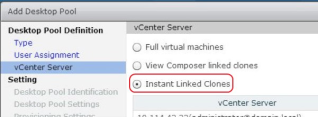
The VMFork technology involves on-the-fly creation of virtual machine clone (VMX-file and process in memory), which uses the same memory (Shared memory) that the parent VM does. At the same time, the child VM cannot write to the shared memory


VMware Social Media Advocacy

VMware Horizon 7 Blast Extreme…

VMware Horizon 7 Blast Extreme Primer—Everything an Admin Needs to Know -VMware EUC Blog

VMware Horizon 7 Blast Extreme…

VMware End-User-Computing Technical Marketing is happy to announce the publication of a new white paper, Blast Extreme Display Protocol in Horizon 7. This white paper includes sections on deployment, optimization tips, security, and using logs for troubleshooting and verifying configuration on both the client side and the agent side (virtual desktop or hosted application). The post VMware Horizon 7 Blast Extreme Primer—Everything an Admin Needs to Know appeared first on VMware End-User…Read More


VMware Social Media Advocacy

Free e-learning course – VMware User…

Free e-learning course – VMware User Environment Manager Fundamentals [V9] -ntpro.nl

Free e-learning course – VMware User…

This course provides an overview to UEM, its components, features, and benefits. The course also explains the UEM installation and configuration process and the features available in the UEM Management Console.


VMware Social Media Advocacy